Pixelcraft Passover: A Nostalgic Twist for Modern Creators
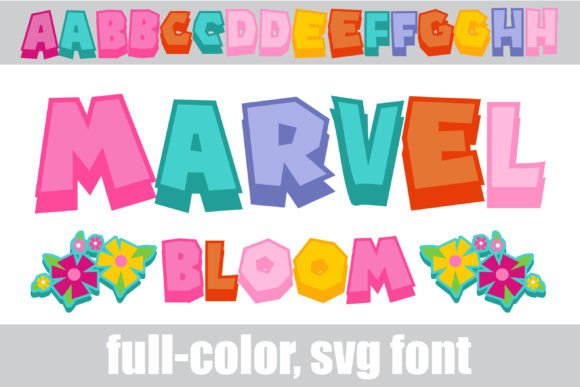
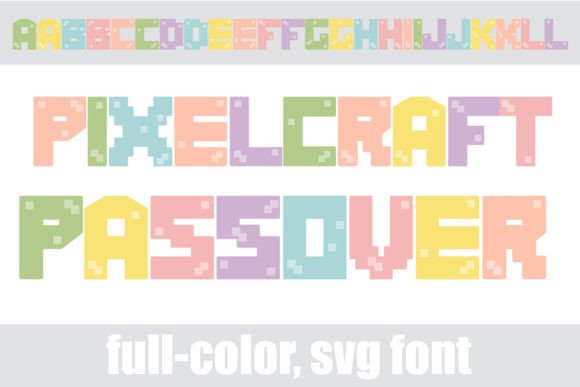
If you’ve ever found yourself staring at a blank design canvas, searching for a typeface that balances playfulness with sophistication, you know the struggle. Too often, fonts are either overly corporate or so decorative that they become illegible. Enter Pixelcraft Passover. This isn't just another display font; it is a unique visual asset that merges the nostalgic charm of video game aesthetics with a soft, contemporary pastel color palette. It is an OpenType full-color (SVG) font, meaning the vector-based color data is embedded directly into the font file. The result is a typeface that pops off the screen, offering a distinct personality that standard monochromatic fonts simply cannot match.
For designers, entrepreneurs, and content creators, the visual language of your brand is often the first conversation you have with your audience. Pixelcraft Passover bridges the gap between retro gaming culture and modern design trends. The "pixel" aspect nods to the 8-bit and 16-bit eras, evoking feelings of nostalgia and fun, while the pastel color scheme keeps the look fresh, airy, and approachable. It is a premium font asset that solves the problem of needing to add color and depth to typography without relying on heavy design software effects or layering multiple text files.
The Technical Edge: How SVG Fonts Revolutionize Workflow
One of the most significant advantages of adopting Pixelcraft Passover into your toolkit is the efficiency of the SVG (Scalable Vector Graphics) format. Historically, if a designer wanted a multi-colored or textured letter, they had to convert the text to outlines, manually select different parts of the letterform, and apply colors individually. This process was time-consuming and made future edits a nightmare. If the client changed the copy, you had to start from scratch.
With this full-color font, the heavy lifting is done for you. You simply install the font just as you would any standard .otf file—via FontBook on Mac or your preferred font manager on Windows. Once activated, you type your words, and the colors appear instantly. This workflow improvement is invaluable for creating social media graphics or marketing assets where speed and consistency are paramount.
It is important to note a technical nuance: because the color data is complex, these fonts will appear as solid black in programs that do not support SVG technology. However, industry-standard software such as Adobe Illustrator, Photoshop, Quark, Inkscape, and Silhouette Studio fully support this technology. When you type into a compatible document, the pastel hues spring to life. This capability transforms the font from a simple text tool into a fully realized design asset.
Practical Applications: From Branding to Merchandise
The versatility of a video game style lettering font extends far beyond gaming blogs. The aesthetic of "geek culture" has gone mainstream, and Pixelcraft Passover fits perfectly into a variety of commercial and creative projects. The soft color palette makes it suitable for industries that need to appear friendly and trustworthy, while the pixel structure adds a layer of technical intrigue.
Consider how this typeface can elevate specific projects:
- Logo Design and Brand Identity: If you are launching a tech startup, a mobile app, or a digital agency, a logo set in Pixelcraft Passover immediately communicates innovation and modernity. It suggests that your brand is digital-native. The built-in color means your logo typography is ready for use on white or light backgrounds without additional modification.
- Packaging Design: For products targeting Gen Z or Millennials—such as cosmetics, artisanal snacks, or stationery—this font creates a "shelf-talker" effect. The pastel colors often align with current design trends in packaging, making the product feel curated and current.
- Invitations and Events: Planning a themed party, a baby shower, or a corporate event with a casual vibe? This font works beautifully for headers on invitations. It sets a joyful tone before the guest even reads the details.
- Merchandise and Apparel: T-shirt design is a perfect use case. Instead of complex vector illustrations, a catchy phrase set in Pixelcraft Passover can serve as the main graphic. The vector-based nature ensures that whether it is printed on a small chest pocket or a large back print, the pixels remain crisp and the colors vibrant.
- Digital Products: If you sell planners, worksheets, or digital stickers, using this font for headers can add a unique selling point to your products, differentiating them from competitors using standard sans-serif fonts.
Maximizing Visual Impact and Readability
While Pixelcraft Passover is visually striking, effective design requires a strategic approach to typography. Because this is a display font with a distinct pixel structure, it is best utilized for headlines, sub-headers, and call-to-action text rather than long-form body copy. Pixel fonts can become difficult to read at small sizes or when used for dense paragraphs.
To ensure your designs remain professional and readable:
- Pairing is Key: Balance the playful nature of Pixelcraft Passover with a clean, neutral companion font. A geometric sans serif font or a simple serif font works well for body text. For example, if your header is in the colorful pixel style, use a font like Montserrat or Open Sans for the description text. This contrast ensures the header stands out without overwhelming the reader.
- Background Considerations: Since the font uses pastel colors, it may lack the contrast needed to be legible on busy or dark backgrounds. Stick to white, light grey, or very pale solid colors to ensure the letterforms remain distinct. If you must use a darker background, consider adding a subtle drop shadow or a backing shape behind the text, though this should be done sparingly.
- Explore the Alt Cases: As mentioned, this font includes additional variations of each letter accessible via your system’s glyph map or character viewer. This feature is a goldmine for customization. By swapping out standard letters for alternates, you can prevent repetitive shapes in words with double letters (like "ll" or "oo") and create a more hand-crafted, organic feel within the digital aesthetic.
Commercial Licensing and Long-Term Value
When investing in a premium font, understanding the licensing is crucial for business owners. Most high-quality design assets, including Pixelcraft Passover, come with specific terms regarding commercial use. Before finalizing a project for a client or launching a product line, always review the license agreement.
Typically, a standard license covers use in digital formats (websites, social media) and physical end-products (printed t-shirts, mugs) up to a certain quantity. If you plan to use the font in software or apps where the font file is embedded, an extended license is often required. Treating typography as a serious business asset protects you legally and ensures you are respecting the work of the type designers who created these intricate SVG glyphs.
Ultimately, Pixelcraft Passover is more than just a novelty; it is a tool for brand recognition. In a crowded marketplace, having a signature look that is instantly recognizable is invaluable. By integrating this unique, colorful, and historically playful font into your visual strategy, you are not just choosing a typeface—you are choosing to make your brand memorable. Whether you are designing a website banner, a product label, or a social media post, this font provides the personality and technical capability to make your vision a reality.