Tetra True: Bringing Retro Game Vibes to Modern Designs
There’s a specific kind of nostalgia that hits you when you see pixel art and bold, blocky lettering reminiscent of the golden age of gaming. It evokes a sense of fun, energy, and a slightly retro flair that many modern brands are trying to capture. If you are working on a project that needs to scream "playful" or "dynamic" without looking dated, you might be hunting for a typeface that bridges that gap. Enter Tetra True, a display font that channels that video game aesthetic while packing a serious punch with full-color capabilities.
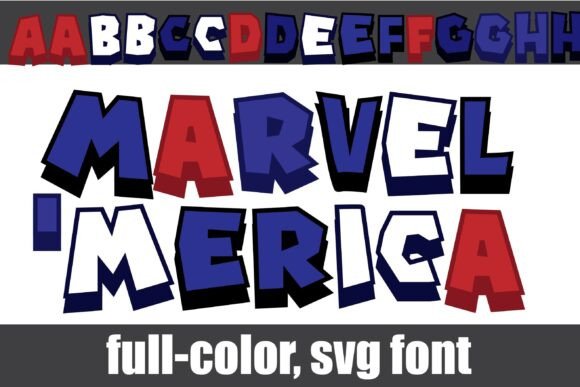
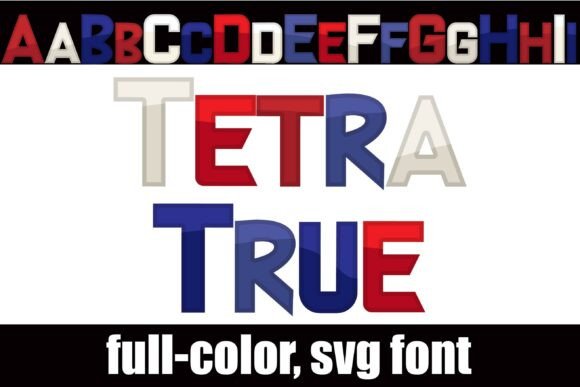
Unlike standard monochromatic typefaces, Tetra True is designed as an OpenType full-color (SVG) font. This means it arrives at your desktop ready to go in vibrant Americana colors. It isn't just black outlines waiting to be filled; it is a fully rendered, colorful asset right out of the box. For designers and creators, this changes the game—literally. You get that retro arcade vibe instantly, making it an excellent choice for headers, logos, and marketing materials where you need to grab attention immediately.
More Than Just Pixels: The Power of SVG Color Fonts
You might be wondering how a font can be "full color." In the past, if you wanted colored letters, you had to rasterize your text in Photoshop or manually add clipping masks in Illustrator. It was a workflow killer. However, modern typography has evolved with SVG (Scalable Vector Graphics) technology. Tetra True utilizes this format to store color information directly within the font file.
For you as a user, the installation process is exactly the same as it has always been. You install the .otf file just like any other font. Mac users can drag it into FontBook, and Windows users can install it via their Control Panel or preferred font manager. The complexity is hidden under the hood; on the surface, it is plug-and-play.
However, there is a small technical nuance to keep in mind regarding compatibility. Because this is a specialized format, not every program will render the colors immediately. In older software or non-compatible programs, Tetra True will show up as a standard black font. Even in modern software that does support color fonts, such as Adobe Illustrator, Photoshop, or Silhouette Studio, the font preview window might still display it in black and white. Don't panic! Once you actually type onto your document canvas, the full Americana colors will reveal themselves.
This technology is supported by major players in the design world. If you use Adobe products, Silhouette Studio, Quark, or Inkscape, you are good to go. This makes Tetra True a versatile tool for everyone from professional graphic designers to hobbyists using cutting machines for custom merchandise.
Unlocking Alternate Styles with Glyph Maps
While the default color scheme of Tetra True is designed to capture that classic Americana vibe, you aren't locked into just one look. One of the most powerful features of this typeface is the inclusion of alternate cases and colorings for each letter.
If the default red, white, and blue palette doesn't quite fit your specific brand identity, you can access these variations through your system’s character map or, more commonly for crafters and designers, through the Silhouette glyph map. This allows you to swap out a standard "A" for an alternate version with a different color gradient or shading style. It provides an incredible amount of flexibility, allowing you to customize the text to match specific color palettes without needing to manually recolor the vector paths. This is a massive time saver when you are iterating on logo designs or social media assets.
Practical Applications for Tetra True
Because of its bold nature and video game heritage, Tetra True isn't necessarily the font you would choose for the body text of a legal contract. However, for display purposes, it is a powerhouse. Its vector-based nature means it scales beautifully. You can blow it up for a massive banner at a trade show or shrink it down for a favicon, and the quality remains crisp.
Here are a few practical ways to integrate this font into your workflow:
- Logo Design & Branding: If you are launching a tech startup, a gaming channel, or a children’s brand, this font sets the tone immediately. It suggests that your brand is approachable, energetic, and fun.
- Packaging Design: Product packaging needs to jump off the shelf. Using a colorful display font for the product name can differentiate you from competitors who stick to standard serif or sans serif fonts.
- Social Media Graphics: On platforms like Instagram and TikTok, attention spans are short. A bold, colorful header created with Tetra True can stop the scroll and increase engagement.
- Merchandise and Apparel: T-shirts, mugs, and stickers thrive on bold graphics. Since the font is already colored, it simplifies the process of creating print-on-demand designs that look vibrant.
- Invitations and Party Decor: Planning a gamer-themed birthday party? This font is perfect for creating custom invitations, cupcake toppers, and banners that look professionally designed.
Improving Visual Consistency and Engagement
Typography plays a massive role in how your audience perceives your message. When you use a font like Tetra True, you are doing more than just spelling out words; you are conveying a specific emotion. The "Americana" color palette often evokes feelings of trust, patriotism, and nostalgia, while the "video game" style suggests excitement and modernity.
Using a consistent typeface across your marketing assets helps build brand recognition. When your followers see that distinct, pixelated, colorful font in their feed, they will immediately associate it with your content. This visual consistency builds trust. It tells your audience that you care about your presentation and that you have a distinct identity.
Furthermore, display fonts are essential for hierarchy in design. You need a way to distinguish your headlines from your body copy. Tetra True serves as the perfect "attention" font. Pair it with a clean, modern sans serif font for your body text (like Montserrat or Open Sans), and you create a beautiful contrast that guides the reader's eye exactly where you want it to go.
Tips for Pairing and Professional Presentation
To get the most out of Tetra True, consider these practical design tips:
- Don't Overuse It: Because it is a "loud" font with inherent colors and shapes, using it for long paragraphs would be exhausting to read. Stick to headlines, sub-headers, and short call-to-action phrases.
- Test Your Pairings: As mentioned, a neutral companion font is crucial. Test Tetra True against different weights of sans serif fonts to see which provides the best readability balance.
- Check Your Licensing: Before you launch a major campaign or sell merchandise featuring this font, double-check the commercial licensing terms. Most premium fonts require a specific license for commercial use (like selling t-shirts), distinct from personal use.
- Play with Backgrounds: Since the font has built-in color, be mindful of your background. High contrast is key. A busy, multicolored background might clash with the font's own colors. Try using solid, darker backgrounds to make the Americana colors pop.
Tetra True offers a unique blend of retro charm and modern font technology. It saves you time with its pre-colored vectors and offers flexibility through its alternate glyphs. Whether you are designing a logo for a new app, creating graphics for a gaming blog, or just looking to add some personality to your next project, this typeface provides the tools to make your text stand out. It is a reminder that typography doesn't have to be static or monochrome—it can be as dynamic and colorful as the ideas you are trying to communicate.